import numpy as np
import pandas as pd
import matplotlib.pyplot as plt
import seaborn as sns12 Data Grouping and Aggregation
The last two chapters used groupby() in its simplest form: one grouping column, one statistic, such as a continent’s mean GDP to fill a gap in Data Cleaning or a spending tertile’s mean graduation rate in Data Preparation. That one line is an instance of a general pattern, and most summaries in data analysis follow it: split the rows into groups, compute something within each group, and combine the results into a table.
This chapter makes that pattern a full tool. It covers counting by category, computing several statistics at once with readable names, grouping by more than one column, and the three things you can do with groups besides summarizing them: give every row a group-level value, keep or drop whole groups, and take a few rows from each. Along the way it asks a question every grouped summary raises: what exactly is being averaged?
By the end of this chapter you should be able to:
- Count rows by category with
value_counts(),crosstab(), andgroupby().size(), and count distinct values withnunique(). - Describe
groupby()as split–apply–combine, and summarize each group with one statistic, several statistics viaagg(), or named results via named aggregation. - Group by two columns, read and select from the resulting two-level index, and turn it back into ordinary columns with
reset_index(). - Decide whether a group mean should weight every row equally or by a size column such as population, and compute a weighted mean by group.
- Use
transform()to give every row a group-level value,filter()to keep or drop whole groups, andhead()orsample()to take rows from each group.
Complete the practice activity after the worked examples.
12.1 Set Up Your Chapter Files
Download the Data Grouping and Aggregation practice kit. Extract stat303-data-aggregation inside the chapters folder of your stat303-1 course folder, open stat303-1 in VS Code, and select the course environment. The terminal opens in stat303-1, so move it into the kit with cd chapters and then cd stat303-data-aggregation before you render the activity.
stat303-1/
├── .venv/
├── assignments/
└── chapters/
    └── stat303-data-aggregation/
        ├── data_aggregation_examples.ipynb
        ├── activity12.ipynb
        ├── README.md
        └── data/
            └── gdp_lifeExpectancy.csv
Run data_aggregation_examples.ipynb for the lesson and complete activity12.ipynb for your own activity report, with stat303-data-aggregation as the notebook working folder. The data is read with the relative path "data/gdp_lifeExpectancy.csv", so the notebooks find it only when that folder is the working folder.
Environment check: This chapter uses NumPy, pandas, matplotlib, and seaborn, all of which are already in the course environment. If an import fails, check the selected notebook kernel first: it must be the course environment, stat303-1/.venv, as in Project Environments, Packages, and File Paths.
12.2 The data
This chapter uses country-level data on life expectancy, population, and GDP per capita, recorded every five years from 1952 to 2007:
gdp = pd.read_csv("data/gdp_lifeExpectancy.csv")
print(gdp.shape)
gdp.head()
(1704, 6)| country | continent | year | lifeExp | pop | gdpPercap | |
|---|---|---|---|---|---|---|
| 0 | Afghanistan | Asia | 1952 | 28.801 | 8425333 | 779.445314 |
| 1 | Afghanistan | Asia | 1957 | 30.332 | 9240934 | 820.853030 |
| 2 | Afghanistan | Asia | 1962 | 31.997 | 10267083 | 853.100710 |
| 3 | Afghanistan | Asia | 1967 | 34.020 | 11537966 | 836.197138 |
| 4 | Afghanistan | Asia | 1972 | 36.088 | 13079460 | 739.981106 |
Each row is one country in one year: lifeExp is life expectancy at birth in years, pop is population, and gdpPercap is GDP per person in inflation-adjusted US dollars. There are no missing values. With 142 countries and 12 years, the table has 142 × 12 = 1,704 rows, and that structure matters for every count below.
12.3 Count by category
The simplest summary of a group is its size. Three tools count, and they differ in what they count and how many columns they cross.
value_counts(), from Pandas Fundamentals, counts the rows in each category of one column:
gdp["continent"].value_counts()continent
Africa 624
Asia 396
Europe 360
Americas 300
Oceania 24
Name: count, dtype: int64These are rows, not countries: Africa has 624 rows because 52 countries are each recorded in 12 years. To count distinct countries, use nunique(), the number of unique values, within each continent:
gdp.groupby("continent")["country"].nunique()continent
Africa 52
Americas 25
Asia 33
Europe 30
Oceania 2
Name: country, dtype: int64Oceania is only 2 countries, Australia and New Zealand. Any comparison involving “Oceania” is a comparison with two countries, which is worth knowing before reading a summary table.
crosstab(), which drew the island-by-species counts in Data Visualization I, counts combinations of two columns. margins=True adds row and column totals labelled All:
pd.crosstab(gdp["continent"], gdp["year"], margins=True)| year | 1952 | 1957 | 1962 | 1967 | 1972 | 1977 | 1982 | 1987 | 1992 | 1997 | 2002 | 2007 | All |
|---|---|---|---|---|---|---|---|---|---|---|---|---|---|
| continent | |||||||||||||
| Africa | 52 | 52 | 52 | 52 | 52 | 52 | 52 | 52 | 52 | 52 | 52 | 52 | 624 |
| Americas | 25 | 25 | 25 | 25 | 25 | 25 | 25 | 25 | 25 | 25 | 25 | 25 | 300 |
| Asia | 33 | 33 | 33 | 33 | 33 | 33 | 33 | 33 | 33 | 33 | 33 | 33 | 396 |
| Europe | 30 | 30 | 30 | 30 | 30 | 30 | 30 | 30 | 30 | 30 | 30 | 30 | 360 |
| Oceania | 2 | 2 | 2 | 2 | 2 | 2 | 2 | 2 | 2 | 2 | 2 | 2 | 24 |
| All | 142 | 142 | 142 | 142 | 142 | 142 | 142 | 142 | 142 | 142 | 142 | 142 | 1704 |
Every continent has the same number of rows in every year, so the data is balanced: no country drops in or out over time. That is worth checking, because a continent whose countries appear only in later years would show a “trend” made by the changing membership rather than by change within countries.
| Question | Tool |
|---|---|
| How many rows in each category? | df["col"].value_counts() |
| How many distinct values in each group? | df.groupby("g")["col"].nunique() |
| How many rows in each combination of two columns? | pd.crosstab(df["a"], df["b"]) |
12.4 Split, apply, combine
Counting is one summary per group. Most questions need others — a mean, a median, a total — and the tool that computes any of them by group is groupby().
Why group and aggregate?
- Summarize a large table. Thousands of rows become one row per group that a reader can take in: total sales by region instead of every transaction.
- Compare categories. Patterns become visible when groups sit side by side: outcomes by treatment group, graduation rates by type of college, life expectancy by continent.
- Follow groups over time. Grouping by a time period — month, quarter, year — turns a stream of records into a trend you can plot.
- Reduce complexity. A summary at the right level answers the question without the noise of every individual row.
Every one of these works the same way. groupby() follows three steps, a pattern known as split–apply–combine:
- Split the rows into groups, one per distinct value of the grouping column.
- Apply a computation to each group separately.
- Combine the results into one Series or DataFrame, labelled by group.
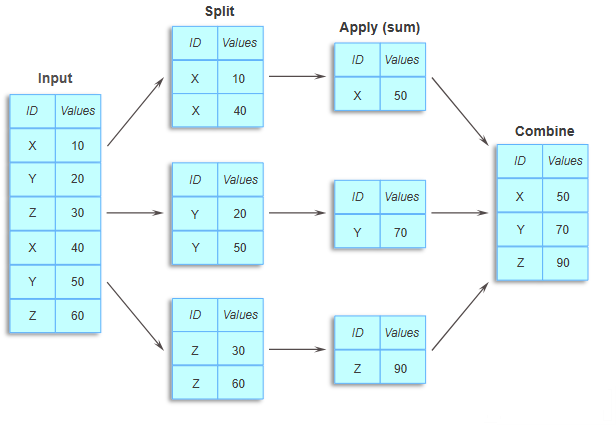
ID into three groups, each group is summed, and the three sums are combined into one table.The diagram’s six rows, as a DataFrame, give exactly its result:
toy = pd.DataFrame({"ID": ["X", "Y", "Z", "X", "Y", "Z"],
                    "Values": [10, 20, 30, 40, 50, 60]})
toy.groupby("ID")["Values"].sum()
ID
X 50
Y 70
Z 90
Name: Values, dtype: int64Split puts rows with the same ID together (X holds 10 and 40), apply sums each group, and combine stacks the three sums into one Series labelled by ID: X = 50, Y = 70, Z = 90. The same three steps run on the GDP data, only with more rows.
gdp.groupby("continent") does only the first step. It returns a GroupBy object that records which rows belong to which group but computes nothing until you ask:
by_continent = gdp.groupby("continent")
by_continent.size()
continent
Africa 624
Americas 300
Asia 396
Europe 360
Oceania 24
dtype: int64size() counts the rows in each group, the same numbers as value_counts(). To see the rows of one group, get_group() returns them as an ordinary DataFrame:
by_continent.get_group("Oceania").head()| country | continent | year | lifeExp | pop | gdpPercap | |
|---|---|---|---|---|---|---|
| 60 | Australia | Oceania | 1952 | 69.12 | 8691212 | 10039.59564 |
| 61 | Australia | Oceania | 1957 | 70.33 | 9712569 | 10949.64959 |
| 62 | Australia | Oceania | 1962 | 70.93 | 10794968 | 12217.22686 |
| 63 | Australia | Oceania | 1967 | 71.10 | 11872264 | 14526.12465 |
| 64 | Australia | Oceania | 1972 | 71.93 | 13177000 | 16788.62948 |
The apply and combine steps happen when you pick a column and a statistic. This is the form from the last two chapters, here giving the mean life expectancy in each continent over all years:
by_continent["lifeExp"].mean().round(1)continent
Africa 48.9
Americas 64.7
Asia 60.1
Europe 71.9
Oceania 74.3
Name: lifeExp, dtype: float64Any statistic you have used on a whole column works per group: mean(), median(), std(), min(), max(), sum(), count() (non-missing values), and size() (all rows). Selecting a list of columns applies the statistic to each:
by_continent[["lifeExp", "gdpPercap"]].median().round(1)| lifeExp | gdpPercap | |
|---|---|---|
| continent | ||
| Africa | 47.8 | 1192.1 |
| Americas | 67.0 | 5465.5 |
| Asia | 61.8 | 2646.8 |
| Europe | 72.2 | 12081.7 |
| Oceania | 73.7 | 17983.3 |
12.5 Summarize with agg()
One statistic per group is often not enough. GDP per capita in 2007 shows why: a mean alone hides how unequal the countries within a continent are. The rest of this section works with that single year:
gdp_2007 = gdp[gdp["year"] == 2007]
gdp_2007.shape
(142, 6)agg() takes a list of statistics and returns one column for each:
gdp_2007.groupby("continent")["gdpPercap"].agg(["mean", "median", "max"]).round(0)| mean | median | max | |
|---|---|---|---|
| continent | |||
| Africa | 3089.0 | 1452.0 | 13206.0 |
| Americas | 11003.0 | 8948.0 | 42952.0 |
| Asia | 12473.0 | 4471.0 | 47307.0 |
| Europe | 25054.0 | 28054.0 | 49357.0 |
| Oceania | 29810.0 | 29810.0 | 34435.0 |
In Asia the mean, about $12,500, is almost three times the median, about $4,500. Half of Asian countries are below $4,500, and a few very rich ones pull the mean up: the same right skew as expenditure in Data Cleaning. In Europe the median is above the mean, because a handful of poorer countries pull the mean down. Reporting both shows what one number alone would hide.
12.5.1 Named aggregation
When the summary is going into a report, give each result a name. Named aggregation passes one argument per output column, written as name=(column, statistic). It also lets each output come from a different column:
summary_2007 = gdp_2007.groupby("continent").agg(
    countries=("country", "nunique"),
    median_gdp=("gdpPercap", "median"),
    mean_life=("lifeExp", "mean"),
    total_pop=("pop", "sum"),
)
summary_2007.round(1)| countries | median_gdp | mean_life | total_pop | |
|---|---|---|---|---|
| continent | ||||
| Africa | 52 | 1452.3 | 54.8 | 929539692 |
| Americas | 25 | 8948.1 | 73.6 | 898871184 |
| Asia | 33 | 4471.1 | 70.7 | 3811953827 |
| Europe | 30 | 28054.1 | 77.6 | 586098529 |
| Oceania | 2 | 29810.2 | 80.7 | 24549947 |
Each argument name becomes a column. The result reads like the table you would put in a report, and the code says exactly what each number is.
12.5.2 Your own statistic
A statistic that pandas does not provide can be written as a function, and agg() will apply it to each group. A lambda, from Pandas Intermediate, is the short form. The range of GDP per capita within each continent:
gdp_2007.groupby("continent").agg(
    lowest_gdp=("gdpPercap", "min"),
    highest_gdp=("gdpPercap", "max"),
    gdp_range=("gdpPercap", lambda x: x.max() - x.min()),
).round(0)| lowest_gdp | highest_gdp | gdp_range | |
|---|---|---|---|
| continent | |||
| Africa | 278.0 | 13206.0 | 12929.0 |
| Americas | 1202.0 | 42952.0 | 41750.0 |
| Asia | 944.0 | 47307.0 | 46363.0 |
| Europe | 5937.0 | 49357.0 | 43420.0 |
| Oceania | 25185.0 | 34435.0 | 9250.0 |
The lambda receives each continent’s gdpPercap values as a Series x and returns one number. The same works for any rule you can write in a line: a percentile with lambda x: x.quantile(0.9), or the share above a threshold with lambda x: (x > 10_000).mean().
| Goal | Code |
|---|---|
| One statistic | df.groupby("g")["col"].mean() |
| Several statistics for one column | df.groupby("g")["col"].agg(["mean", "median"]) |
| Named results, any columns | df.groupby("g").agg(name=("col", "mean"), ...) |
| Your own statistic | name=("col", lambda x: x.max() - x.min()) |
12.6 Group by two columns
Grouping by continent alone mixes 55 years together. To follow each continent over time, group by continent and year by passing a list:
life_by_year = gdp.groupby(["continent", "year"])["lifeExp"].mean().round(1)
life_by_year.head(14)
continent year
Africa 1952 39.1
1957 41.3
1962 43.3
1967 45.3
1972 47.5
1977 49.6
1982 51.6
1987 53.3
1992 53.6
1997 53.6
2002 53.3
2007 54.8
Americas 1952 53.3
1957 56.0
Name: lifeExp, dtype: float64The result has one row per continent–year combination, 5 × 12 = 60 in all, and a two-level index (also called a MultiIndex): continent on the outer level and year on the inner. .loc[] selects from it. One label selects a whole outer group; a tuple selects a single row:
print(life_by_year.loc["Oceania"])
print("Africa, 2007:", life_by_year.loc[("Africa", 2007)])
year
1952 69.3
1957 70.3
1962 71.1
1967 71.3
1972 71.9
1977 72.9
1982 74.3
1987 75.3
1992 76.9
1997 78.2
2002 79.7
2007 80.7
Name: lifeExp, dtype: float64
Africa, 2007: 54.8For most further work — plotting, filtering, merging — ordinary columns are easier than a two-level index. reset_index(), from Pandas Fundamentals, moves the index levels back into columns:
life_trend = life_by_year.reset_index()
life_trend.head()| continent | year | lifeExp | |
|---|---|---|---|
| 0 | Africa | 1952 | 39.1 |
| 1 | Africa | 1957 | 41.3 |
| 2 | Africa | 1962 | 43.3 |
| 3 | Africa | 1967 | 45.3 |
| 4 | Africa | 1972 | 47.5 |
In that form the summary goes straight into a seaborn plot from Data Visualization I. The ax.legend(loc="upper left", ncols=5) line lays the legend out in one row above the lines, using the ncols= from the shared legend in Data Visualization II, so it covers none of the data:
fig, ax = plt.subplots(figsize=(8, 4.5), layout="constrained")
sns.lineplot(data=life_trend, x="year", y="lifeExp", hue="continent", marker="o", ax=ax)
ax.set(xlabel="Year", ylabel="Mean life expectancy (years)", ylim=(35, 89),
       title="Life expectancy rose everywhere, but Africa stalled after 1987")
ax.legend(title=None, loc="upper left", ncols=5)   # one row, clear of the lines
plt.show()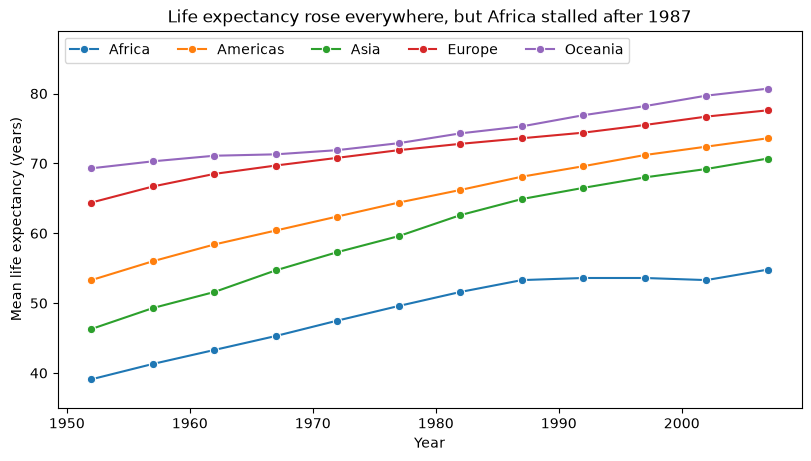
Every continent gained, and Africa’s gain stalled from the late 1980s to the early 2000s while the others kept rising. Turning a grouped Series into a wide table, with one column per year, is reshaping, which is the subject of the next chapter.
12.7 What a group mean averages
Each value in that plot is a mean over countries: Mongolia and China count equally toward Asia’s figure. That answers the question “what was life expectancy in a typical Asian country?” It does not answer “how long did a typical person in Asia live?”, because China and India hold most of Asia’s people.
The second question needs a weighted mean, in which each country counts in proportion to its population:
\[\text{weighted mean} = \frac{\sum (\text{pop} \times \text{lifeExp})}{\sum \text{pop}}\]
groupby() can compute both sums at once. Make a column of the products, sum it and pop by group, and divide:
gdp["pop_x_life"] = gdp["pop"] * gdp["lifeExp"]
sums = gdp.groupby(["continent", "year"])[["pop_x_life", "pop"]].sum()
weighted_life = sums["pop_x_life"] / sums["pop"]

asia = pd.DataFrame({
    "per country (unweighted)": life_by_year.loc["Asia"],
    "per person (weighted by population)": weighted_life.loc["Asia"],
}).round(1)
asia.loc[[1952, 1982, 2007]]| per country (unweighted) | per person (weighted by population) | |
|---|---|---|
| year | ||
| 1952 | 46.3 | 42.9 |
| 1982 | 62.6 | 61.6 |
| 2007 | 70.7 | 69.4 |
In 1952 the typical Asian country had a life expectancy of 46.3 years, but the typical Asian person only 42.9, because the most populous countries had some of the lowest values. Dividing two group sums keeps everything aligned by the shared continent–year index, so each weighted mean uses its own group’s numbers.
Plotting both versions over every year shows something the three rows hide. asia.plot(), the pandas plotting from Data Visualization I, draws one line per column against the index:
fig, ax = plt.subplots(figsize=(8, 4.5), layout="constrained")
asia.plot(ax=ax, marker="o")
ax.set(xlabel="Year", ylabel="Life expectancy in Asia (years)",
       title="Per person, Asia's life expectancy fell in 1962; per country, it rose")
plt.show()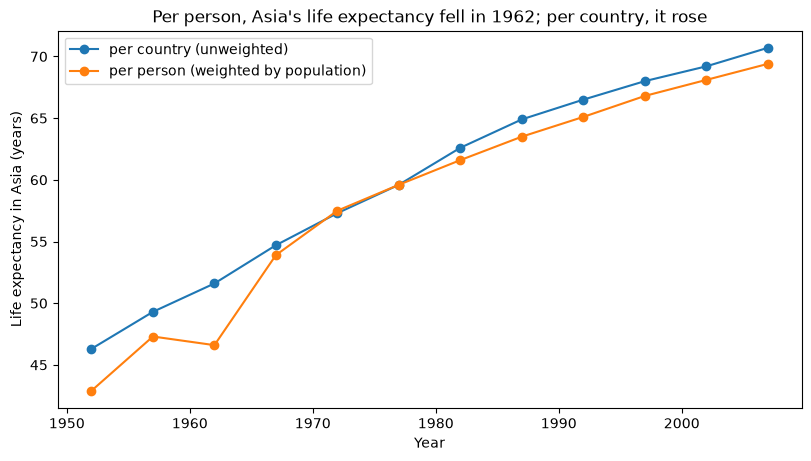
Between 1957 and 1962 the per-country line keeps rising, but the per-person line falls, from 47.3 to 46.6 years, and the gap between them jumps to 5 years. The cause is one country. China’s life expectancy dropped from 50.5 years in 1957 to 44.5 in 1962, the years of the famine of 1959–1961, and China held 39% of Asia’s people. In a per-country mean China is one country in 33, so the drop barely registers; weighted by population, it dominates.
Neither mean is wrong; they answer different questions. When you report a group mean, say which one it is — per country, per person, per college — because the reader cannot tell from the number.
12.8 Give every row a group value: transform()
Summaries return one row per group. Sometimes you want the group value on every row instead, to compare each row with its own group. Data Cleaning used transform("mean") to fill a missing GDP with its continent’s mean; the same tool answers “how does each country compare with its continent in the same year?”:
continent_year_mean = gdp.groupby(["continent", "year"])["gdpPercap"].transform("mean")
gdp["gdp_vs_continent"] = gdp["gdpPercap"] / continent_year_mean

gdp.loc[gdp["year"] == 2007,
        ["country", "continent", "gdpPercap", "gdp_vs_continent"]].sort_values(
"gdp_vs_continent", ascending=False).head().round(2)| country | continent | gdpPercap | gdp_vs_continent | |
|---|---|---|---|---|
| 551 | Gabon | Africa | 13206.48 | 4.28 |
| 167 | Botswana | Africa | 12569.85 | 4.07 |
| 491 | Equatorial Guinea | Africa | 12154.09 | 3.93 |
| 1619 | United States | Americas | 42951.65 | 3.90 |
| 911 | Libya | Africa | 12057.50 | 3.90 |
transform("mean") returns 1,704 values, one per row in the original order, so it can be divided into gdpPercap directly. A value of 2 means twice the continent’s mean in that year. Any statistic name works in transform(), as does a lambda.
The table says Gabon’s GDP per capita in 2007 was 4.28 times Africa’s mean: oil revenue spread over a small population, in a continent where the typical economy is far poorer. Four of the top five are African for the same reason. A few such countries are also what puts Africa’s mean GDP per capita ($3,089 in 2007) at about twice its median ($1,452).
12.9 Keep or drop whole groups: filter()
filter() tests each group against a rule and keeps all the rows of the groups that pass. The rule is a function that receives one group as a DataFrame and returns True or False. Which countries gained more than 30 years of life expectancy between 1952 and 2007?
big_gainers = gdp.groupby("country").filter(
    lambda g: g["lifeExp"].max() - g["lifeExp"].min() > 30
)
print(big_gainers["country"].nunique(), "countries")
big_gainers["country"].unique()
9 countries<StringArray>
[ 'Indonesia', 'Korea, Rep.', 'Libya',
'Nicaragua', 'Oman', 'Saudi Arabia',
'Vietnam', 'West Bank and Gaza', 'Yemen, Rep.']
Length: 9, dtype: strEvery row of those 9 countries is kept, all 12 years each, so the result can be plotted or summarized like the full data. A Boolean mask on rows, by contrast, tests each row on its own:
over_70 = gdp[gdp["lifeExp"] > 70]
print(len(over_70), "rows from", over_70["country"].nunique(), "countries")
493 rows from 84 countriesThe mask keeps every country-year above 70, so most of those 84 countries appear only for their later years. Use a mask for a rule about a row, and filter() for a rule about a group as a whole.
12.10 Take rows from each group: head() and sample()
To take the top rows of each group, sort first, then take head() within each group:
(gdp[gdp["year"] == 2007]
    .sort_values("lifeExp", ascending=False)
    .groupby("continent")
.head(2)[["continent", "country", "lifeExp"]])| continent | country | lifeExp | |
|---|---|---|---|
| 803 | Asia | Japan | 82.603 |
| 671 | Asia | Hong Kong, China | 82.208 |
| 695 | Europe | Iceland | 81.757 |
| 1487 | Europe | Switzerland | 81.701 |
| 71 | Oceania | Australia | 81.235 |
| 251 | Americas | Canada | 80.653 |
| 1103 | Oceania | New Zealand | 80.204 |
| 359 | Americas | Costa Rica | 78.782 |
| 1271 | Africa | Reunion | 76.442 |
| 911 | Africa | Libya | 73.952 |
That is the two longest-lived countries of each continent in 2007. The expression is wrapped in parentheses so that each step can sit on its own line.
sample() draws rows at random within each group. A plain random sample of the whole table reflects the continents’ sizes, so Oceania, with 24 rows, would barely appear. A stratified sample takes the same number from every group instead:
stratified = gdp.groupby("continent").sample(n=24, random_state=303)
stratified["continent"].value_counts()
continent
Africa 24
Americas 24
Asia 24
Europe 24
Oceania 24
Name: count, dtype: int64random_state=303 fixes the random draw, so the sample is the same every time the cell runs. Here n=24 takes every Oceania row, since that is all there is.
| Goal | Result | Code |
|---|---|---|
| One row per group | Summary table | df.groupby("g").agg(...) |
| Group value on every row | Same rows, new column | df.groupby("g")["col"].transform("mean") |
| Keep whole groups that pass a rule | Fewer rows, whole groups | df.groupby("g").filter(lambda g: ...) |
| First rows of each group | A few rows per group | df.sort_values(...).groupby("g").head(n) |
| Random rows from each group | A few rows per group | df.groupby("g").sample(n=..., random_state=...) |
12.11 Summary Cheat Sheet
Counting.
| Goal | Code |
|---|---|
| Rows per category | df["col"].value_counts() |
| Rows per group | df.groupby("g").size() |
| Distinct values per group | df.groupby("g")["col"].nunique() |
| Rows per combination of two columns | pd.crosstab(df["a"], df["b"], margins=True) |
Summarizing.
| Goal | Code |
|---|---|
| One statistic per group | df.groupby("g")["col"].mean() |
| Several statistics | df.groupby("g")["col"].agg(["mean", "median", "max"]) |
| Named results | df.groupby("g").agg(name=("col", "mean"), other=("col2", "sum")) |
| Your own statistic | name=("col", lambda x: x.max() - x.min()) |
| Group by two columns | df.groupby(["a", "b"])["col"].mean() |
| Select from a two-level index | s.loc["outer"], s.loc[("outer", inner)] |
| Back to ordinary columns | s.reset_index() |
| Weighted mean by group | sum w * x and w by group, then divide |
Beyond summaries.
| Goal | Code |
|---|---|
| Group value on every row | df.groupby("g")["col"].transform("mean") |
| Keep whole groups by a rule | df.groupby("g").filter(lambda g: ...) |
| Top rows per group | df.sort_values("col").groupby("g").head(n) |
| Stratified random sample | df.groupby("g").sample(n=..., random_state=...) |
The rule to remember: before you report a group summary, know how many rows and distinct units are in each group, and what each one counts for.
12.12 Practice Activity: Split, Summarize, and Compare
Goal: Summarize one dataset by group in several ways, and say what each summary counts.
File: activity12.ipynb from the practice kit.
Submit: activity12.html through the final upload question in the Data Grouping and Aggregation Canvas quiz.
This section contains the complete activity instructions. The starter loads the data and supplies spaces to record your work. Open activity12.ipynb from the folder prepared in Set Up Your Chapter Files, using the same project environment. The worked examples above are preparation, not additional submission requirements.
The starter loads gdp from the kit’s data/ folder and makes gdp_1977, the rows for 1977.
A. Count Before You Compare
- Replace
Your Namein the opening Raw cell’sauthorfield. Run the setup cell; it must report the shapes(1704, 6)and(142, 6). - Report the number of rows and the number of distinct countries in each continent, and explain in one sentence why the two counts differ.
- Name the continent you would be most cautious about comparing with the others, and say why.
B. A Summary Table With Named Columns
- Using
gdp_1977, build one table with named aggregation that gives, for each continent, the number of countries, the mean and median ofgdpPercap, and the total population. - Name the continent whose mean and median GDP per capita differ the most, and explain what that difference says about the countries in it.
C. Per Country or Per Person?
- For each continent in 1977, compute mean life expectancy twice: once with every country counting equally, and once weighted by population.
- Name the continent where the two differ most, and explain in one or two sentences why weighting changes it in that direction.
D. Every Row Against Its Group, and Whole Groups by a Rule
- Use
transform()to add a column giving each country’s life expectancy minus its continent’s mean in the same year. Show the five countries furthest below their continent’s mean in 1977. - Use
filter()to keep the countries whose population more than tripled between 1952 and 2007, and report how many there are.
Render and Submit
Restart the kernel, run all cells in order, resolve unexpected errors, and save. Include your outputs and explanations for A–D, and a short Markdown completion note. From stat303-data-aggregation in the terminal, run:
quarto render activity12.ipynb --to htmlFollow the Quarto refresher: inspect the HTML and a copy opened outside the project folder, and confirm that every output appears and your name is on the report. Upload only activity12.html to the Data Grouping and Aggregation Canvas quiz; keep your notebook locally.
HTML grading (16 points): row and country counts with the explanation and the cautious comparison (4); the named-aggregation table and the mean–median explanation (4); unweighted and weighted means with the explanation (4); the transform() column with its five countries, and the filter() count (3); name, readable report, and completion note (1).
12.13 Extended Practice
These longer exercises are additional practice, not requirements for the Canvas quiz. Work in a separate notebook beside your activity and load the data the way the chapter does. Include your code, outputs, and explanations.
12.13.1 The World Over Time, Two Ways
Compute world life expectancy for every year twice, per country and per person, and plot both lines on one figure. When are the two furthest apart, and which countries drive the gap? Repeat for GDP per capita.
12.13.2 Correlation Within Each Continent
For each continent, compute the correlation between lifeExp and gdpPercap over all years. Unlike agg(), which hands its function one column of each group, apply() hands it the whole group as a DataFrame, so the function can use two columns at once: gdp.groupby("continent")[["lifeExp", "gdpPercap"]].apply(lambda g: g["lifeExp"].corr(g["gdpPercap"])). Then repeat with np.log(gdpPercap). Which continents change most, and why might a log make the relationship more linear?
12.13.3 Biggest Gains and Losses
For each country, compute the change in life expectancy from each survey year to the next. Which country had the largest single five-year drop, and when? The hint is diff(), which subtracts each value from the one after it: gdp.sort_values(["country", "year"]).groupby("country")["lifeExp"].diff(). Grouping by country means one country’s last year is never compared with the next country’s first.
12.13.4 A Fair Sample
Draw a stratified sample of 10 countries per continent (all 12 years of each), rather than 10 rows. Hint: sample from the 2007 rows to choose the countries, then keep every row for those countries with isin(). Compare the mean life expectancy of your sample with the full data’s.
12.14 Before You Move On
The habit to carry forward is knowing what a group summary counts. A count of rows is not a count of units; a mean over countries is not a mean over people; a continent with two countries is not comparable, on equal terms, with a continent of fifty. None of these produces an error, and every one changes what a summary table says.
The other habit is choosing the operation by the shape of the result you need: one row per group to summarize, every row with a group value to compare, whole groups to keep or drop, or a few rows from each group to sample.
For any grouped summary you make or read, you should be able to answer five questions:
- What are the groups, and how many rows and distinct units does each contain?
- Which statistic summarizes each group, and why that one?
- Does each row count equally, and should it?
- Is the data balanced across groups and over time?
- Did you need one row per group, or a group value on every row?
Continue to Data Reshaping, where grouped results like these are rearranged between long and wide tables.
References: pandas: group by (split-apply-combine), DataFrame.groupby, DataFrameGroupBy.agg, DataFrameGroupBy.transform, DataFrameGroupBy.filter, DataFrameGroupBy.sample, pd.crosstab, and DataFrame.reset_index.